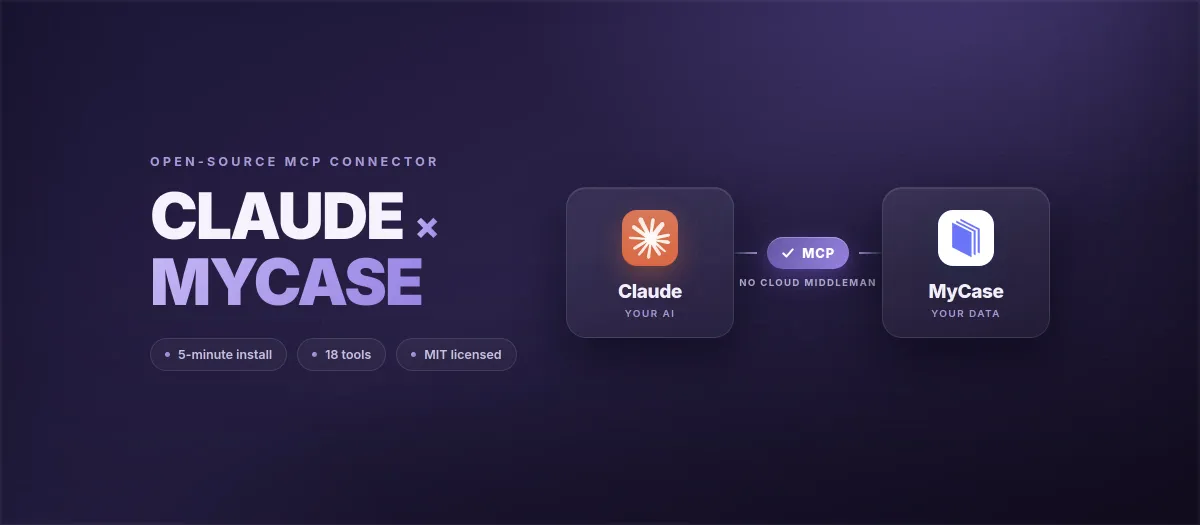
If your firm runs on MyCase, you've probably hit a wall when trying to use Claude (or any general-purpose LLM) with your case data. There are two ways most firms have handled it so far:
- Copy-paste: manually pull case notes or document text out of MyCase and paste it into Claude. Works for one-off tasks, fails the moment you want anything that touches multiple matters or runs on a schedule.
- MyCase IQ: the AI feature built into the MyCase Pro and Advanced tiers. Lawyerist's review notes IQ supports only pre-configured prompts customized for specific tasks, which reduces hallucinations but caps what you can actually ask. You're not getting Claude. You're getting a vendor-curated subset.
Both approaches break the same way: they treat the AI as a separate product layered on top of MyCase. They don't give the AI structured, scoped, auditable access to your firm's actual data.
That's what an MCP server does. And as of May 2026, no one had shipped one for MyCase. So we built one, open-sourced it, and published it under MIT license on npm and the official MCP Registry.
Short answer
- What it is: the first open-source MCP connector for MyCase. Claude reads your cases, contacts, documents, calendar, and billing through MyCase's own API, on your machine, nothing routed through us, every call logged.
- Get it free:
npm install -g @oktopeak/mycase-mcp, or start on the MyCase MCP server page, which carries the current setup steps and FAQ. - Don't want to register the OAuth app and wire audit logging yourself? We deploy it in your firm with a fixed-price proposal.
What MCP changes
MCP (Model Context Protocol) is Anthropic's open standard for letting Claude talk to external systems. An MCP server is a small program that runs locally, holds credentials for one specific service, exposes a defined set of tools to Claude, and returns results inside the user's Claude session.
The architecture is the point. With an MCP server in front of MyCase:
- The server runs on the attorney's own machine. OAuth tokens for MyCase live in an encrypted file under
~/.oktopeak-mycase/, not on a third-party server. - Claude reads MyCase data through the same OAuth-scoped API that any sanctioned MyCase integration would use. Nothing screen-scrapes, nothing sits between MyCase and Claude.
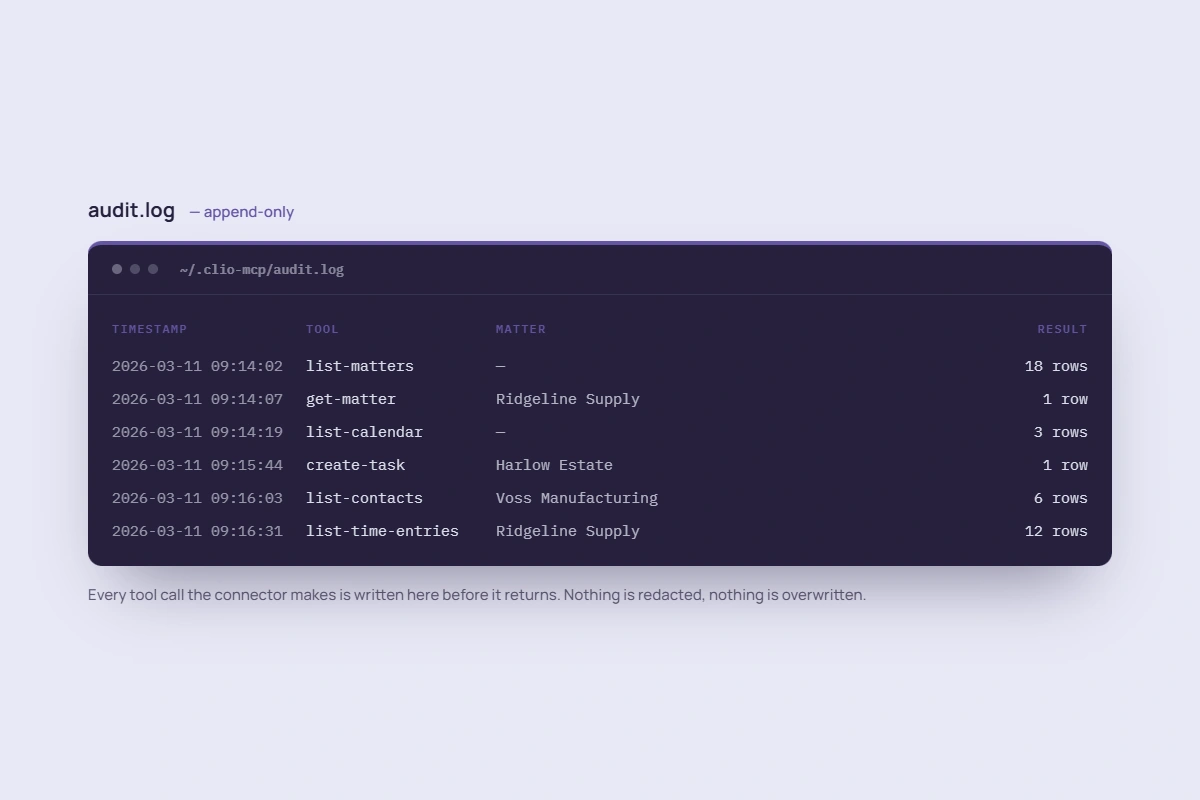
- Every tool call writes a line to a local audit log. Timestamp, tool name, input parameters, result count, MyCase user ID. Append-only. Aligned with what ABA Formal Opinion 512 expects from AI use on client data.
- No data passes through Oktopeak. The server is a piece of code your firm runs. It does not call home.
The cheaper, faster, more flexible AI experience is on one side of that diagram. The "vendor-curated AI feature with limited prompts" is on the other.
What the connector covers
18 tools total: 15 feature tools across the eight resource areas a practicing firm actually uses MyCase for, plus 3 authentication helpers (authenticate, auth-status, logout). Read access spans everything; write access is deliberately scoped to a small set of low-liability operations.
| Tool | MyCase Resource | What it does |
|---|---|---|
list-cases | Cases | List cases, filter by status (Open/Closed/Pending) |
get-case | Cases | Full case record by ID |
create-case | Cases (write) | Create a case with clients, staff, and metadata |
search-contacts | Contacts | Search by name, email, or company |
get-contact | Contacts | Full contact record |
list-tasks | Tasks | Filter by case, due date, status |
create-task | Tasks (write) | Create a task on a case with due date and priority |
list-documents | Documents | Documents on a case |
get-document-url | Documents | Pre-signed download link |
list-calendar-events | Calendar | Hearings and deadlines by date range |
log-call | Calls (write) | Log a call note to a case (experimental, off by default) |
list-staff | Staff | List firm staff members |
get-staff | Staff | Full staff member record by ID |
list-time-entries | Time | Billable hours by case |
get-billing-summary | Invoices | Outstanding invoices and trust balances (read-only) |
Two MCP resources expose state to Claude at session start: mycase://auth/status shows the current connection state and firm name, and mycase://compliance/info shows an ABA Opinion 512 reminder. Both are read-only and surface in compatible MCP clients automatically.
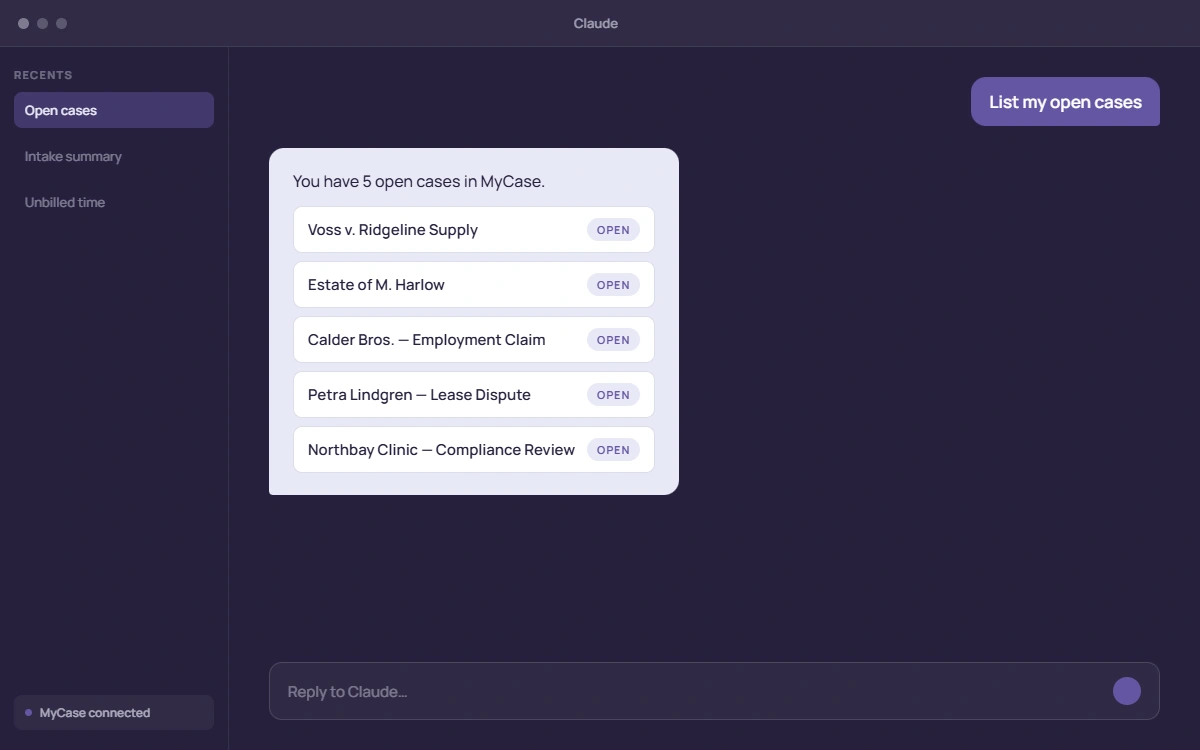
list-cases against a demo MyCase account and returning the result inline.Why writes are scoped
The connector reads everything but writes in only three places: creating tasks, creating cases, and logging call notes. The last of those (log-call) is experimental and stays off unless you explicitly enable it with MYCASE_EXPERIMENTAL_TOOLS=1, because its API endpoint is still being verified. Contacts, documents, calendar events, staff, time entries, and billing are all read-only.
An LLM that can mutate contact records, modify time entries, or alter invoices is a malpractice incident waiting for a trigger.
This is deliberate. An LLM that can mutate contact records, modify time entries, or alter invoices is a malpractice incident waiting for a trigger. A wrong tool call doesn't just cost you data, in legal practice it can cost you a bar complaint or a fee dispute. Tasks, case creation, and call notes are the right places to let an AI write because they're easy to review, low-stakes if wrong, and they're what attorneys actually want to automate (capturing follow-ups during a Claude session, opening a matter from an intake conversation, logging a call summary).
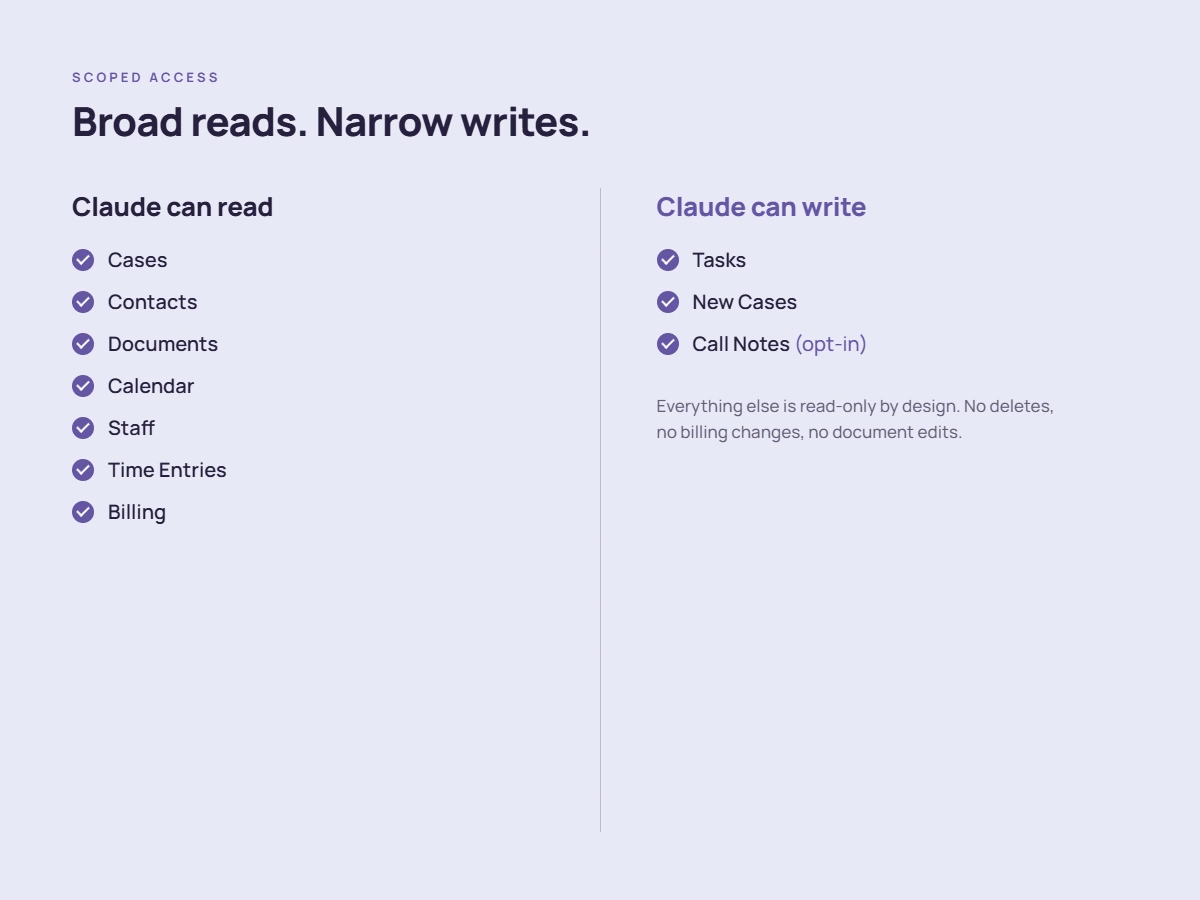
If your firm has a specific need to expand write scope (for example, time-entry creation from email triage), the connector is MIT-licensed and the architecture supports adding tools without modifying the audit, auth, or rate-limit layers. We've built that for firms in our legal AI integration engagements.
ABA Opinion 512 alignment
ABA Formal Opinion 512 (issued July 2024) sets baseline expectations for how a lawyer using generative AI handles client data: informed consent, supervision, confidentiality, and the ability to demonstrate what happened. The connector implements three of those structurally:
- Append-only audit log at
~/.oktopeak-mycase/audit.log. Every tool call writes a line: timestamp, tool name, parameters, result count, MyCase user ID. The log doesn't mutate. It is what your bar wants to see if you are ever asked to demonstrate AI use. - Encrypted credential storage using AES-256-GCM. Tokens never sit in plaintext, environment variables, or shell history.
- Confidentiality boundary. The MCP server runs locally. The OAuth scope is your firm's. No data crosses Oktopeak's infrastructure. Your engagement with Anthropic for Claude is governed by Anthropic's own enterprise terms (which prohibit training on customer-submitted content).
The log doesn't mutate. It is what your bar wants to see if you are ever asked to demonstrate AI use.
For the deeper read on Opinion 512 and the chatbot-specific implications, see What ABA Formal Opinion 512 Actually Requires From Your Law Firm's AI Chatbot.
Setup
Five minutes, assuming you already have MyCase Advanced and Claude Desktop or Claude Code.
Before you start
MyCase Advanced tier required. The MyCase Open API is gated to the Advanced tier ($130/user/month with annual billing, up from $109 in 2026): Pro and Basic accounts cannot get API keys, and there is no workaround.
- Email MyCase support to request an OAuth application. They'll ask for: a redirect URI (use
http://127.0.0.1:5678/callback, which matches the connector default), the read/write access level you want, and an admin email on your MyCase account. MyCase support issues a client ID and secret directly. - Install the connector globally:
npm install -g @oktopeak/mycase-mcp - Add the server to your Claude Desktop config (
claude_desktop_config.json) or Claude Code MCP config, withMYCASE_CLIENT_ID,MYCASE_CLIENT_SECRET, and a 64-character hexENCRYPTION_KEYin the env block. Restart Claude. - Inside Claude, call the
authenticatetool. A browser tab opens for MyCase login. Once you approve, the loopback callback completes the OAuth flow and tokens are encrypted to~/.oktopeak-mycase/tokens.enc. - Try a test query: "List my open cases." Claude calls
list-cases, returns the result, and an entry appears in~/.oktopeak-mycase/audit.log.
Watch for this
The redirect URI has to match exactly what you register with MyCase support: http://127.0.0.1:5678/callback is the connector's default. A mismatch here is the most common reason the OAuth handshake in step 4 fails.
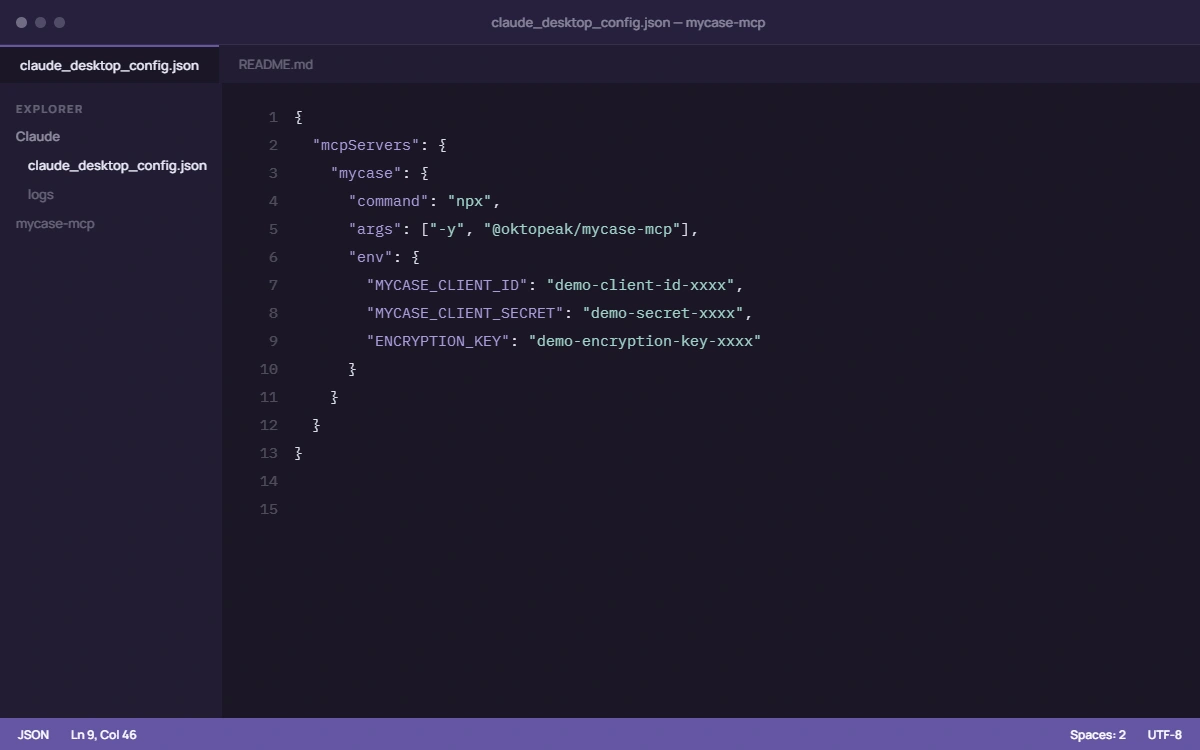
claude_desktop_config.json, ready to go (demo values shown).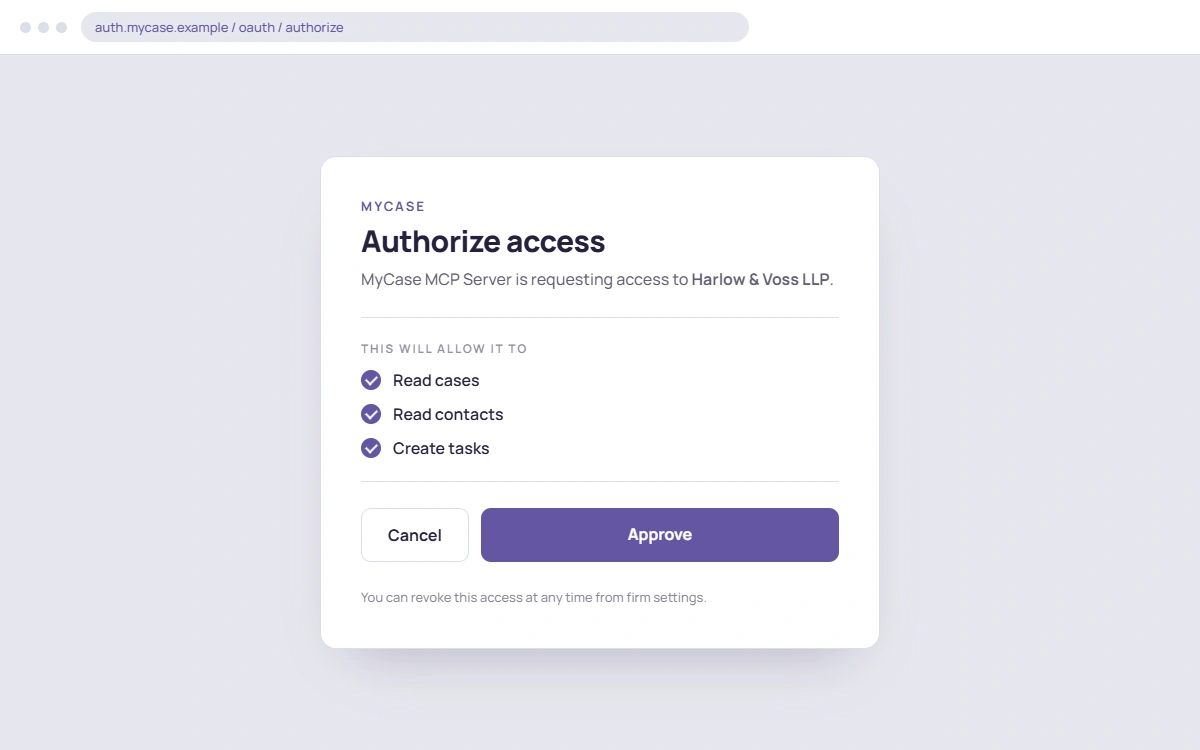
authenticate tool opens this approval screen once, then tokens are encrypted to disk.Full setup walkthrough including the troubleshooting list lives in the README at github.com/oktopeak/mycase-mcp.
Limitations
- MyCase Advanced tier required. The MyCase Open API is gated to the Advanced tier ($130/user/month with annual billing, up from $109 in 2026). The connector cannot work around this: Pro and Basic accounts cannot get API keys.
- Single firm, single user per installation. One OAuth scope per running instance. Multi-firm or multi-user scenarios need a separate, hosted MCP server architecture; we build those as part of integration engagements but the open-source version is for individual installs.
- stdio transport only in v1. No hosted HTTP MCP server, no remote access. Claude Desktop, Claude Code, and any other MCP-compatible client running on the same machine, that's the surface area.
- No write access on cases, contacts, documents, calendar, time entries, or billing. By design (see "Why writes are scoped" above).
- Rate-limited at 30 req/min by default. MyCase doesn't publish a hard rate limit; we use a conservative cap and respect
Retry-Afterheaders when MyCase returns 429.
Who this is for
Solo and small-firm attorneys on MyCase Advanced who want to use Claude for the things general LLMs are actually good at: drafting from precedent, summarizing matters, extracting data from documents, building case timelines, triaging intake, and combining MyCase data with other tools (court docket APIs, internal docs, jurisdiction-specific research) inside a single Claude session.
If you've already paid for MyCase Advanced (which includes IQ), you're not replacing IQ with this. You're getting a second AI surface that doesn't have IQ's prompt restrictions, that can be combined with other MCP servers, and that is fully auditable.
Want it running without doing the setup yourself?
The connector is free and installs in minutes. Registering the MyCase OAuth app, scoping credentials, and wiring the audit-log destination so ABA 512 logging is satisfied from day one is the part most firms would rather hand off. With Guided Setup we deploy it inside your firm: scoped OAuth, the audit-log destination wired into your stack, a workflow built with your team, and training for your IT lead and a champion attorney. Fixed-price proposal within five business days. No retainer, no lock-in.
See Guided Setup →If you need this in production at firm scale (multi-user, hosted, custom workflows, integration with iManage/NetDocuments/document review tools), that's the work we do for law firms. Legal AI integration engagements typically run 4-6 weeks and include a hardened deployment of the open-source connector plus the firm-specific extensions.
Ship details
- Source: github.com/oktopeak/mycase-mcp (TypeScript, MIT)
- npm:
@oktopeak/mycase-mcp@1.0.4(npm install -g @oktopeak/mycase-mcp) - MCP Registry:
io.github.oktopeak/mycase-mcpv1.0.4 (auto-ingested by PulseMCP and mcpservers.org) - Companion connector: if your firm uses Clio instead of (or alongside) MyCase, the Clio MCP connector is built on the same architecture
- The full set: see all four connectors (Clio, MyCase, Filevine, IntakeQ) in the MCP Connectors case study
Questions, issues, feature requests: GitHub issues. Want it deployed in your firm without the OAuth and audit-logging legwork: Guided Setup. Need it at firm scale, every attorney signed in as themselves, one audit log for the whole firm: Firm-Wide Deployment. Extending it for a specific workflow: book a call.
And if you want the field data behind connectors like this one: we asked 32 legal professionals what actually eats their day, the findings are free.